Enjoying a computer doesn’t depend on speed, brand, or price alone — it truly depends on knowing and using the features that remove daily pain points. Many users struggle every day, not because their computer is bad, but because they are unaware of powerful built-in tools designed to improve comfort and productivity.
One of the biggest real struggles computer users face today is eye pain and headaches caused by long screen time. Students, office workers, developers, designers, and even casual users experience blurry vision, burning eyes, and fatigue after staring at bright screens for hours.
What many people don’t realize is this:
Modern computers now come with smart features that directly solve these problems.
Today, I’ll be showing you one powerful feature that can instantly improve your comfort and make using a computer truly enjoyable again.
🌙 Feature Spotlight: Dark Mode & Eye Comfort
Dark Mode is a simple but powerful feature that reduces excessive brightness by switching the interface to darker tones. This helps your eyes relax, especially during long working hours and at night.
✅ What Dark Mode Solves:
- Reduces eye strain and headaches
- Makes content easier to read
- Helps prevent sleep disturbances
- Improves focus and visual comfort
- Saves battery life on laptops
This small switch can make a huge difference in how long and how comfortably you can work on your computer.
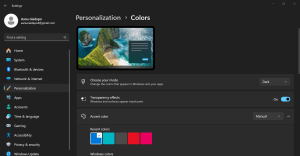
⚙️ How to Enable Dark Mode (Windows)
To enable Dark Mode on your computer:
- Go to Settings
- Click on Personalisation
- Select Colours
- Under Choose your mode, select Dark
✅ Instantly, your entire system will switch to an eye-friendly dark display.
🔑 The Eye-Opening Truth
Most people think they need a new computer to solve discomfort and productivity issues.
In reality, they only need to unlock the right features in the one they already have.
Your computer is already powerful — you just need to use it the smart way